
Teacher Registration
Teacher Dashboard
Upload Lists
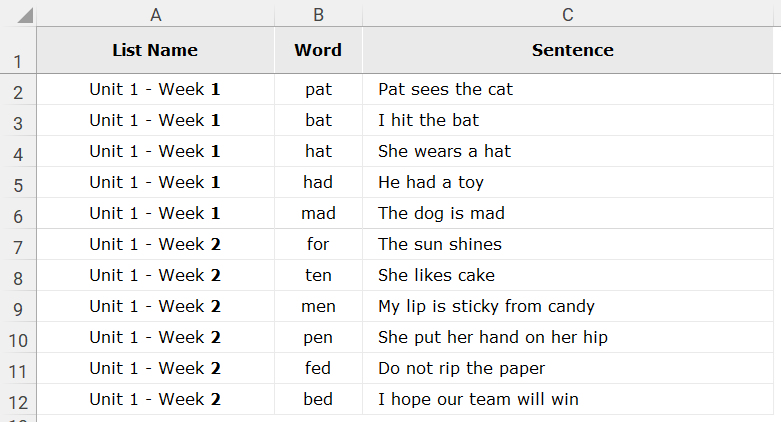
Click the Upload List button to upload an Excel file
with the layout below.
The file must have three columns:
Column A: List name (e.g., Unit
1 Week 1)
Column B: The word itself
Column C: A sentence that
includes the word
NOTE: To enter words one-by-one, click Publish
Download Wordlists
Voice & Audio
Voice Selection
Choose a voice for word pronunciation.
Speed
Adjust how fast words and sentences are read.
My School
School name
| Name | Class | Actions |
|---|
School Applications
No applications waiting.
| School | Applicant | Location | Submitted | Actions |
|---|
Admin Management
Schools
Manage educational institutions in the system.
Teachers
Manage teacher accounts and assignments.
Test Feedback
Give immediate feedback to students during tests
During TESTS: When enabled, the next word arrow (">") will show a green mark around it if the word is correctly spelled and a red mark if not.
OFF
Support Spelling Chimps
Help us keep improving!
Spelling Chimps makes spelling fun for all elementary learners. Patreon support helps us keep it free, grow new features, and maintain our servers. Thank you!
Terms of Service and Privacy Policy
Terms of Service (ToS)
Last Updated: October 25, 2026
1. Welcome to Spelling Chimps!
This is an agreement between you and Abrakadata, LLC ("we," "us," or "our") that governs your use of the Spelling Chimps web application and related services (the "App"). If you are a parent or legal guardian, you agree to these terms by letting your child use the App. If you are a teacher or school administrator, you agree to these terms by creating an account or registering a school.
2. Who Can Use the App
Students and guests (no login): Students play by picking their school and class, and guests play the built-in word lists. Neither needs an account, a password or an email address. The App is designed for elementary school children to use under the supervision of a parent, guardian or teacher.
Parents/Guardians: You must be at least 18 years old and legally able to agree to these terms. You agree to supervise your child's use of the App.
Teachers: Teachers log in to create, edit, publish and delete word lists for their classes. Your name, your school, your class and your published word lists are PUBLICLY available: anyone who visits the App can see them so that students can find their class.
School Administrators: A school administrator is the person whose school registration we approved. School administrators log in to manage their school: rename it, see the teachers registered at it, and remove teachers from it. They can also do everything a teacher can.
Platform Administrator: Our own staff manage the whole App: they review school registrations, and can create, view, change and delete any school, teacher or word list.
Your Consent is Key: By using the App, you confirm that you (or, for a child, the child's parent or legal guardian) consent to our Privacy Policy below.
3. Registering a School
Anyone may apply to register a school using "Register your school". You confirm that you are authorized by the school to do so and that the information you give us is accurate.
We review every application and may approve or reject it at our discretion. We email you our decision. If we approve it, we create the school and a school administrator account for you, and email you a link to set your password. Applications that are not reviewed within 14 days expire.
4. Accounts and Responsibilities
Who has an account: Only teachers and administrators have accounts. Teachers create their own account with "Sign Up" and choose their school. School administrator accounts are created when we approve a school registration.
Account Security: You are responsible for keeping your login information private and secure, and for everything done with your account.
Removal: A school administrator may remove a teacher from their school, and we may remove any account that breaks these terms. Removing a teacher permanently deletes that teacher's account and word lists.
5. Rules for Use
We want the App to be a safe, positive, and educational space.
Teachers and School Administrators: If you create and share content (such as spelling lists) or manage a school, you agree that: (1) Content Must Be Educational: All shared content must be appropriate for children and strictly related to educational purposes; (2) No Student PII: You must never include any personally identifiable information (PII) about students in word lists, class names or any other content; (3) Supervision and Consent: You confirm that you have obtained all parental consent required by your school or district policies for students to use the App; (4) Accurate School Information: School administrators keep their school's details accurate and remove only teachers who no longer belong to the school.
Parents and children: The App does NOT provide a mechanism for you to share any personally identifiable information (like names, addresses, phone numbers, etc.).
ALL users: DO NOT steal our work. No one is allowed to copy, sell, or distribute any part of the App, its content, or code without our permission. All content is owned by us.
ALL users: DO NOT use the App to transmit viruses or attempt to gain unauthorized access to ours or third-party systems.
6. Privacy and Data
We Take Privacy Seriously. Protecting your privacy is our top priority.
Please Read the Privacy Policy: This ToS is tied to our Privacy Policy below, which explains exactly what information we collect from teachers, school administrators and school applicants, how we use it, and your rights. You must agree to the Privacy Policy to use the App.
7. Changes to the ToS
We may update these terms from time to time. We will notify you of any material changes by posting the new ToS on the App and/or sending you an email. Your continued use of the App after the changes means you accept the new terms.
8. Contact Us
If you have any questions about this ToS, your account, your school, or your child's privacy, please contact us:
Email: support@abrakadata.com
Privacy Policy
Last Updated: October 25, 2026
1. Overview
This Privacy Policy explains how Spelling Chimps (“we”, “us”, “our”) collects, uses, and protects information about teachers, school administrators and people who apply to register a school. We do not create accounts for students or guests, and we do not collect personally identifiable information (PII) about students.
2. Information We Collect
Teacher and Administrator Accounts: Name, email address (required for login), and password or authentication data (managed by our authentication provider; we never see your password). We also store your role (teacher, school administrator or platform administrator) and the school you belong to.
Classroom & Usage Information: School and class names, the word lists and game settings you create, and records of administrative actions (for example, approving a school or removing a teacher).
School Registrations: When you apply to register a school we collect your first and last name, email address, school name, city, state, country and, if you choose, a short description of your school. To prevent abuse we limit how many applications can come from one internet connection per day; for this we store a one-way scrambled (hashed) form of your IP address, never the address itself.
3. Students and Children’s Privacy
Students never log in. They use the App anonymously by picking a school and a class; guests play without picking anything.
We do not ask students or guests for names, email addresses, or any other personal identifiers.
A student's or guest's session and game progress are kept only in their own web browser, and a student session ends when the browser tab is closed. We do not store student progress on our servers.
4. How We Use Information
We use the information we collect to: create and manage accounts and logins; review school registrations and email applicants our decision and a link to set their password; let students find their school, class and word lists; let school administrators see and manage the teachers at their own school; maintain the security and integrity of the App; and improve its features, performance, and reliability.
We do not sell any information to third parties.
5. Who Can See What
Everyone: Teacher names, school names, class names and published word lists, because students choose their class from them.
School Administrators: The teachers registered at their own school, and nothing about other schools beyond what everyone can see.
Platform Administrators (our staff): All schools, teachers, word lists and school registrations, in order to run the App.
6. Data Storage and Security
Account and school data is stored in secure, access-controlled databases hosted by Google Firebase. Passwords and authentication tokens are handled using industry-standard security practices. Platform administrator logins expire after a few hours.
We apply reasonable technical and organizational measures to protect your information from unauthorized access, disclosure, or misuse.
7. Sharing of Information
We share information only with trusted service providers who help us operate the App and who are contractually obligated to protect the data (Google Firebase for hosting, databases and login, and our email provider for sending registration and account emails); if required by law or legal process; or in connection with a business transaction (such as a merger or acquisition), subject to continued protection of the data.
We do not share student PII because we do not collect student PII.
8. Data Retention
We keep account data for as long as the account is active or as needed to provide the service. We keep school registrations as a record of our decision.
When a teacher is removed or an account is deleted, its account and word lists are deleted. You may also ask us to delete your account or your school registration; we will remove or anonymize the data within a reasonable period, subject to legal obligations.
9. Your Choices and Rights
Teachers and administrators may update account details via the App where supported or by contacting us; request access to, correction of, or deletion of their information, subject to verification; and opt out of non-essential communications where applicable. School applicants have the same rights over the information in their application.
10. Changes to This Policy
We may update this Privacy Policy from time to time. When we do, we will change the “Last updated” date and may provide additional notice for material changes. Continued use of the App after changes are posted means you accept the updated policy.
11. Contact Us
If you have questions about this Privacy Policy or how we handle your information, please contact us at:
Email: support@abrakadata.com
Word 1 of 12
Word 1 of 12